Aws Certified Solutions India

Basic Mean App

This post continues Getting started with MEAN stack.

This post talks about scaffolding with Yeoman. A Scaffolding tool, as the name suggests, is a tool to generate boiler plate code conforming to preset convention. i.e What section of code goes in to which file and where does that file go.

Here’s an easy way to get an app running. It’s a generic application about books and authors.

You downloaded the MEAN source code from the previous procedure. In this one we are going to do that with a generator.

Yeoman

install it using NPM

$ npm install -g yo
$ npm install -g generator-meanjs

See what Yo has to offer.

$ yo --help

You should see a list of parameters along with currently installed generators and sub-generators.

Get Yo to generate a template application for you.

$ yo meanjs

This will ask you a few questions about what to use (use the latest stable not the master), what to generate.

you can opt to populate the app with a sample application. Yo will generate Articles and Users module.

Run it.

$ grunt

See it at

http://localhost:3000

You should be able to see some seed articles and users. You can create some more users and write articles after logging-in. Go ahead to update and delete articles and users.


Cloud Application Development Services India

Getting started with MEAN stack

This is a basic introduction to get started with MEAN stack.

You should also check out other more advanced work flows using MEAN stack for a production run.

You’ll have to install some dependencies before you can actually install MEAN stack. For this purpose I’m assuming you’ll be running a linux development machine. Although windows should work fine. You should be having sudo permission on your linux machine.

I highly recommend a 64 bit OS.

Introduction

At its core Mean stack is but a set of configuration documents to be executed by Node. Read this introduction on MEAN stack.

Its a construct.

It has the configuration needed to work with Express.js, Mongodb and Angular.js.

It lets you organize and order your code by a set convention.

Loads of developer tools to work through the development phase.

Node

Node is a JavaScript run time environment. It just runs any js file you give it to execute.It can be any thing not just a web application. This means you can run a JS file anywhere not just a browser you can manage to install Node.

The installations are best at the Node official site 

Be sure to get the stable version (not necessarily the latest) from the site. 4.X at the time of writing.

Open up your terminal.


curl -sL https://deb.nodesource.com/setup_4.x | sudo -E bash -
sudo apt-get install -y nodejs


sudo apt-get install -y build-essential

We do need the build tools.

The -y flag tells apt to silently install the package.

Check the node installation

$ node -v

and

$ npm -v

at command prompt. You should see something like

v4.x.x

depending on version selected.

Common errors in Node installation is permission issues, make sure you have sudo permission and write permission to root.

Mongodb

More detailed instructions at mongodb official site.

Your server needs to know about the mongodb package and its sources.

Be sure to use the version specific to your installation.  – the following is for ubuntu 12.04 64 bit.

sudo apt-key adv --keyserver hkp://keyserver.ubuntu.com:80 --recv 7F0CEB10
echo "deb http://repo.mongodb.org/apt/ubuntu precise/mongodb-org/3.0 multiverse" | sudo tee /etc/apt/sources.list.d/mongodb-org-3.0.list
sudo apt-get update

Install Mongodb

sudo apt-get install -y mongodb-org

Check for installation

$ mongo

it should give you the installed version number, connection status, and a mongodb command prompt

See this post to Mongodb Management.

MEAN

Mean stack construct provides a good number of developer tools accessible by grunt or gulp. These are task runners.

Gulp comes with the stack. You should install Grunt if you prefer that to Gulp.

$ npm install -g grunt-cli

Install Bower

Bower is a front end package manager.

$ npm install -g bower

Now we are ready for MEAN.

Create a working directory

Download MEAN from Git repo

$ git clone https://github.com/meanjs/mean.git meanProj
$ cd meanProj/
$ npm install

This should take a while. NPM now brings all the packages listed in packages.json file in the downloaded sources and installs them locally in the project folder.

You will probably see errors is the installation process due to some missing dependency packages. You’ll have to install these missing packages and try npm install again.

NPM will also run ‘bower install’ for front end dependencies.

You should see a success output in your command prompt once the installation is done.

you can now start your meanProj app by running

$ grunt

Cloud Application Development Services India

Mean Stack – for dummies

Mean stack is the latest buzz around. But In the olden days – some thing like a couple of years ago, when you went to your developer and asked him to build you some thing, he probably said he’ll do it a LAMP stack.

LAMP stack

You knew what a LAMP stack was. You heard it so many times. It filled you with comfort to hear that this new build is a LAMP stack as well.  – All was well.

LAMP – is Linux, Apache, Mysql and php BTW.

There used to be a time when the php bit was just pure php. The developer had to literally start from scratch. The php these days is usually a construct. A framework (in php) which lets us develop quickly.

Developer Tools

You see, we developer folk are never satisfied with what the tools we have to build stuff.

There are developers who make it their job to ease the pain of fellow developers – bless them. They come up with constructs, conventions and even design patters we use to build applications. You may have heard of some of these.

MVC is a design pattern – its a convention suggesting how to go about building your app. Laravel, Cakephp etc are frameworks that follow that design pattern.

This works on your server. – the back-end – your clients don’t see any of this (and we want to keep it that way).

What makes the website come alive in your browser is a client side script. JavaScript. What developers often refer to as frontend is HTML, CSS and JS  combined. So called as they work on the client side.

JavaScript

This JS is a pretty versatile language but used primarily for such scripting. Quite a few developers realized the potential of JS and started to develop programs that run off of JS scripts on the server.

One such program to come out is called Node. Basically its a program which runs any JS file you give it. – Great. A few more developers thought about and built a framework in js – much like Laravel or Cakephp  – one of these frameworks is Express.

MEAN Stack

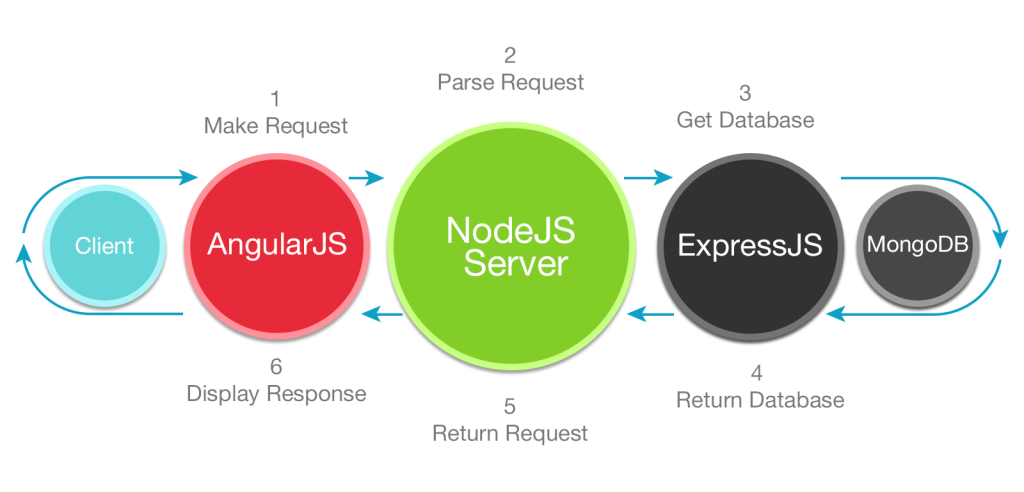
You probably know what MEAN stack stands for  – Mongodb, Experss, Angular and Node.

All of these technologies are Javascript based. Which means there isn’t any need for a developer to be a master on two languages. He can develop both the front and the back end.

Express works very well with the MongoDB – a NoSQL document based db. The NoSQL part means that to scale up your NoSQL db, you can add another server instead of beefing it up to scale up a SQL database. Being able to do so is a big deal.

A growing need for Rich internet applications, or Single Page applications triggered the development of Angular.js. (Something like gmail – where you dont see the page reload while navigating from one page to another.)

All four of the technologies combined make for quite a convenient tech stack. It’s biased to split the back-end from the front end.- I.e we no longer render the page at the server and send it to the browser like we did traditionally.

This means that all the back end is supposed to do is to handle the data sent back and forth from the other end. What ever it may be. – browser front end, Android / iOS application, 3rd party service, what have you..

This from of loosely coupled data service is known as an API.

So .. this is the proposition of a MEAN stack.

You get a Single Page Application,

Your backend is already set up to be an API.

You are covered for scalability,

Pretty Rosy picture – yeah?

For the most Part .. That’s the reason why you thought you needed to know about MEAN stack..